
Showing posts with label Joomla Tips and Tricks. Show all posts

Thursday, September 30, 2010

Remove "Welcome to the Frontpage" on your front page

The Problem:
I do not want the "Welcome to the Frontpage" title to appear on my front page. How do I remove it?

The Remedy:
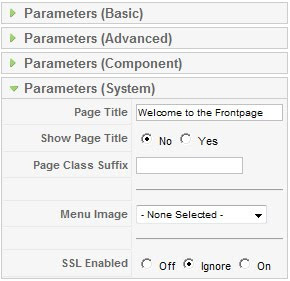
1. From the Admin Control Panel, go to Menus > Main Menu.
2. Click on the 'Home' link.
3. Click on Parameters (System).
4. Change the "Welcome to the Frontpage" sentence in the Page Title field to your website title (or whatever title you think suitable). This will become the document title.
5. Select "No" for the "Show Page Title" field.
6. Do not forget to Save or Apply.

Joomla Resources:

Wednesday, September 29, 2010

PDF File Fails to Display Correctly

The Problem:

In IE7, when you click on the PDF icon, PDF file fails to display correctly. The pop-up window is empty.


The Remedy:


1. Download this file: browser_detection.zip.


2. Extract the zip file.


3. Upload browser_detection.php to the folder libraries/joomla/utilities/ of your site.


4. Find the file icon.php in the folder components/com_content/helpers/.


5. Edit icon.php as follows:


In line 1, after the <?php tag, type in the following code:
require_once("libraries/joomla/utilities/browser_detection.php");

It becomes:
<?php require_once("libraries/joomla/utilities/browser_detection.php");

Search for the following code somewhere in line 60:
$attribs['onclick'] = "window.open(this.href,'win2','".$status."'); return false;";

Replace the line with the following code:

$user_browser = browser_detection('browser');
if ($user_browser == 'msie7') {
$attribs['target'] = '_blank';
} else {
$attribs['onclick'] =
"window.open(this.href,'win2','".$status."'); return false;";
}

6. Save and upload the file to components/com_content/helpers/.

Note: You may need to clear your cache before you can see the PDF working.

Joomla Resources:
The easiest, fastest way to learn Joomla.
Publish a magazine with Joomla.
SEO Club.
Joomla! Extensions Directory.

Tuesday, September 28, 2010

"Global Use" Does Not Work

The Problem:

You do not want to display "Written by", "Created Date and Time" and "Modified Date and Time" in your article. In Joomla 1.5, you can set the configuration globally by setting the Parameters in the Article Manager. (Content > Article Manager > Parameters icon). So now, when you create a new article, under the Parameters (Advanced) in Article Editor, there's no need to choose the dropdown menu to hide the unwanted fields. Use Global should do the job. Right? Wrong... it doesn't work.

The Remedy:
For some reasons, the global settings (Use Global) will not work if Joomla was installed together with sample data. Just make sure, the next time you install Joomla, you do not install the sample data. Until now, we still do not find any other remedy besides this one. We'll post it here if we find any other solution to this problem.


Joomla Resources:
The easiest, fastest way to learn Joomla.
Publish a magazine with Joomla.
SEO Club.
Joomla! Extensions Directory.